Installing MySQL database
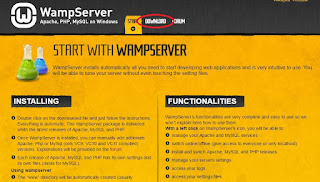
In this lesson we will cover the installation of wamp server on an windows PC, which will install a MySQL database engine as well, and we will focus on the MySQL database. In order to download the wamp server go to http://www.wampserver.com/ , click the download button as shown in the figure 1. Figure 1: Download wamp server In the download session click the appropriate version for your machine. On the window that pops up click the link marked with number one in order to download the Visual Studio 2012 VC 11 vcredist_x64/86.exe file if you don't have it and than after installing that file click the link marked with number two shown in the figure 2 to download the wamp server. Figure 2: Wamp server download steps After download process has finished install the wamp server normally like every other program and give permission to pass traffic through firewall. After completing the installation of wamp server run it and wait for the wamp icon in the taskbar to become green ...