Posts

Showing posts with the label edit label from code

C++ Beginner: Lesson 4 - Tic Tac Toe game
Image
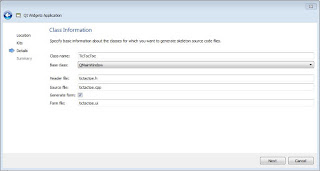
In this lesson we will cover if condition which we saw in the previous lesson as well, and we will cover the switch control statement too. Other elements that we will cover in this lesson are one and two dimensional arrays and we will see the for loop as well. During this lesson we will develop the tic tac toe game. In order to do so, we need to create a new project as we have seen in lesson 1 , but in this case we will call the application TicTacToe and the class will be named TicTacToe as well as shown in the figure 1. Figure 1: TicTacToe game The first step to create the TicTacToe application is to prepare the layout of the window. From the toolbox panel we take the Grid Layout element and drag it into window and than select the window and press the Lay Out in a Grid button as shown in the figure 2. Figure 2: Grid layout After the setup of the layout we start dragging and dropping into the window 9 QPushButton elements as shown in the figure 3 bellow. Figure 3: Add butt...

C++ Beginner: Lesson 3 - Simple calculator

Image
After we got familiar with Qt Creator environment in the lesson 2 we will build a simple calculator in order to get familiar with some data types which come with Qt Creator framework like QString and other C++ primitive data types. First of all we need to create a new project as shown in the lesson 1 . During the creation, instead of mainwindow class we have used calculator class. After creating the project, in design view of qt creator we create the layout of our application. Initially we get a LineEdit element from the toolbox panel as shown in the figure 1. Figure 1: Add LineEdit on window After we add the line edit on window we fix the size according to our needs, in this case we fill the window horizontally by leaving some margin right and left. After we add the LineEdit element on window we need to add the buttons for the numbers and operations as well as shown in the figure 2. Figure 2: Add PushButton on window After we add the buttons as shown in the figure above we ...

C++ Beginner: Lesson 2 - Introduction to Qt environment

Image
The series of lessons in C++ will be developed based on tasks differently from the java lessons which are based on specific concepts for each lesson and will be depended on Qt Creator IDE, which is a very powerful IDE, strength of which we will see in every lesson and project. In this lesson we will explore a little bit more the environment of Qt Creator. As we saw in the lesson 1 , after we create the project we get the window with the view shown in the figure 1. Figure 1: Design mode The square marked with number 1 in the figure 1 shows the are of the window which we can edit by adding other elements or by changing its properties. The square marked with number 2 shows the toolbox area from where elements can be dragged and dropped in the are 1. The square marked with number 3 shows the properties of the selected item, in case of the figure 1 the selected item is the entire window, but we can select other elements that we drop on window in order to see their properties or ch...