C++ Beginner: Lesson 4 - Tic Tac Toe game
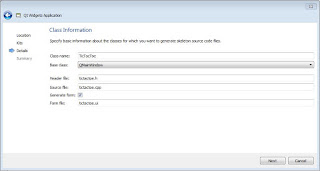
In this lesson we will cover if condition which we saw in the previous lesson as well, and we will cover the switch control statement too. Other elements that we will cover in this lesson are one and two dimensional arrays and we will see the for loop as well. During this lesson we will develop the tic tac toe game. In order to do so, we need to create a new project as we have seen in lesson 1 , but in this case we will call the application TicTacToe and the class will be named TicTacToe as well as shown in the figure 1. Figure 1: TicTacToe game The first step to create the TicTacToe application is to prepare the layout of the window. From the toolbox panel we take the Grid Layout element and drag it into window and than select the window and press the Lay Out in a Grid button as shown in the figure 2. Figure 2: Grid layout After the setup of the layout we start dragging and dropping into the window 9 QPushButton elements as shown in the figure 3 bellow. Figure 3: Add butt...