Posts

Showing posts with the label for loop

C++ Beginner: Lesson 4 - Tic Tac Toe game
Image
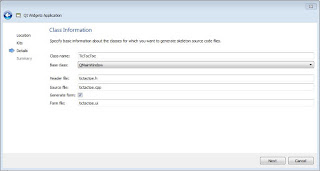
In this lesson we will cover if condition which we saw in the previous lesson as well, and we will cover the switch control statement too. Other elements that we will cover in this lesson are one and two dimensional arrays and we will see the for loop as well. During this lesson we will develop the tic tac toe game. In order to do so, we need to create a new project as we have seen in lesson 1 , but in this case we will call the application TicTacToe and the class will be named TicTacToe as well as shown in the figure 1. Figure 1: TicTacToe game The first step to create the TicTacToe application is to prepare the layout of the window. From the toolbox panel we take the Grid Layout element and drag it into window and than select the window and press the Lay Out in a Grid button as shown in the figure 2. Figure 2: Grid layout After the setup of the layout we start dragging and dropping into the window 9 QPushButton elements as shown in the figure 3 bellow. Figure 3: Add butt...

Exercise Beginner: Sort array(Bubble sort)

Image
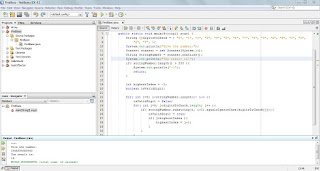
Request: Write a program that inputs n natural numbers and a natural number k. Sort the input by non-descending order and then insert element k in such a way that the new resulted array is also sorted (1 ≤ n ≤ 1000, 1 ≤ numbers, k ≤ 1000000). Solution In order to be able to solve this exercise the programmer must know the concept of array which we have seen on lesson 8 , if condition which we have seen on lesson 4 and the for loop which we have seen on lesson 7 . So from the request we see that we must get from the user the k number. We can do this operation through the given code bellow: Example code: System.out.println("Gvie the k element:"); int k = scannInt.nextInt(); Where scannInt is an instance of Scanner class which is shipped within JDK and is found inside the java.util package, so in order to use it we need to add the line bellow in the beginning of the application if our class is not inside any package or directly bellow the package if the ...

Exercise Beginner: Rotate matrix 90 degrees

Image
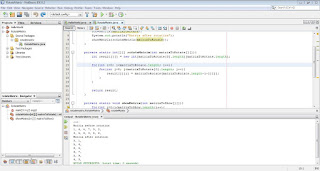
Request: Write a program that rotates the given matrix 90 degrees clockwise. The matrix size is n × m. (1 ≤ n, m ≤ 50, -10^9 Solution We will solve this problem with a concrete case, by using the matrix shown bellow: Example code: 1, 6, 4, 7, 9, 3, 3, 5, 8, 3, 5, 6, and the result for this specific case should be as follow: Example code: 3, 1, 5, 6, 8, 4, 3, 7, 5, 9, 6, 3, In order to reach such result we need the result matrix hight to be same as the input matrix width and the result matrix width to be same with the input matrix height. The new location In order to have a matrix in code we have to declare a two dimensional array as seen bellow. Example code: int matrixToRotate[][] = {{1,6,4,7,9,3}, {3,5,8,3,5,6}}; In order to implement the logic described bellow we will have to write the following code. Example code: public class RotateMatrix { public static void main(String[] args) { int matrixToRotat...

Exercise Beginner: Base of the number

Image
Request: You are given a string (less than 255 characters). Write a program that determines whether the given string is a number in some number system with a base not more than 16, and, if so, determine the base of the number system, otherwise print -1. Solution First we declare an array of strings which will hold all the possible values of digits that system numbers with base till 16 can have. Than we get the number to be analyzed from user. Being that in the request we have that the given string must not have more than 255 characters this is the first controll tha we make, if the string is larger than 255 characters we print the value -1, which means that we do not have a valid input and we return by ending the method execution. We declare an integer variable highestIndex intialized with the value -1 and a boolean variable isValidDigit. The highestIndex variable will store the value of the biggest valid base for the digits of the string taken in input, and the boolean variable isV...

Exercise Beginner: Product of numbers

Image
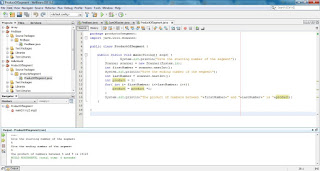
Request: Find the product in a segment of numbers when there is given the beginning of the segment and the ending of the segment. Solution This exercise can have different solutions, in this case we will show the one by using the for loop. If you are not familiar with the for loop follow the lesson 7 first. One possible solution of this problem is shown in the example code bellow: Example code: import java.util.Scanner; public class ProductOfSegment { public static void main(String[] args) { System.out.println("Give the starting number of the segment"); Scanner scanner = new Scanner(System.in); int firstNumber = scanner.nextInt(); System.out.println("Give the ending number of the segment"); int lastNumber = scanner.nextInt(); int product = 1; for( int i= firstNumber; i As it can be seen is a straightforward solution, where after taking the starting element and ending element from us...

Java Beginner: Lesson 7

Image
for loop After showing the while and do while loops in the previous lessons we will see the for loop in this lesson. We will see 2 types of implementation of the for loop in this lesson. The first way to implement the for loop, an unusual one, is the one shown bellow, editing the code of the previous lessons to replace do while with for to keep the same functionality we get: Example code: // TODO code application logic here Scanner scanner = new Scanner(System.in); double nr1=0; double nr2=0; String operation; double result =0; for( ; true ; ){ System.out.println("**********NEW OPERATION*********"); System.out.println("Give the first number: "); nr1= scanner.nextDouble(); System.out.println("Give the operation: "); operation = scanner.next(); System.out.println("Give the second number: "); ...